
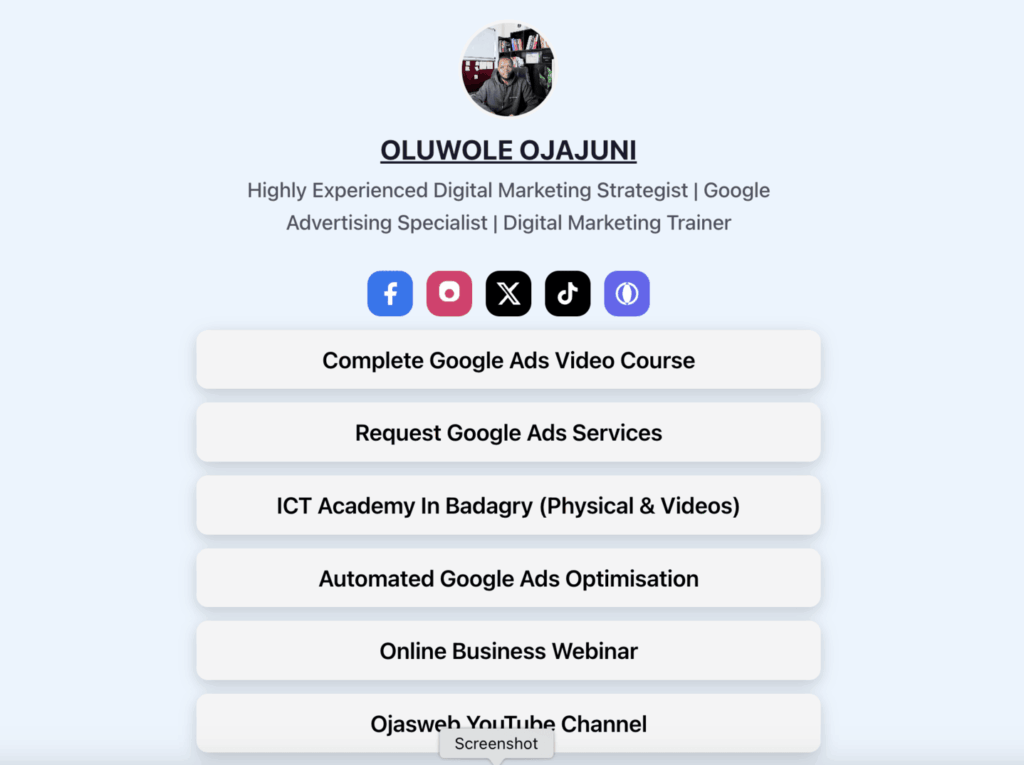
If you use Instagram, TikTok, YouTube, LinkedIn, X, Facebook, or another social platform to promote your business, you have probably encountered the “one link in bio” problem.
You may have a website, online store, WhatsApp link, blog, YouTube channel, lead magnet, course, booking page, social profiles, affiliate offers, and several other destinations you want people to visit.
But your social profile gives you only one prominent bio link.
That is where link-in-bio tools became popular.
A platform such as Linktree allows you to create one page containing multiple links, then place that single page URL in your social media profile. Linktree describes a link-in-bio page as a single URL that opens a page containing curated links to your content, products, and channels.
The problem is that many businesses eventually discover an important branding issue:
The link you are sharing belongs to someone else’s platform.
Instead of:
yourbrand.com/links
you may end up sharing something like:
linktr.ee/yourbrand
That difference may appear small, but your URL is part of your brand identity.
This is where LinksPally takes a different approach.
If your website runs on WordPress, LinksPally can turn your own website into the infrastructure behind your links. Its WordPress integration is designed around branded, controlled links rather than forcing your audience through another company’s domain.
And that makes LinksPally worth considering when you are looking for a Linktree alternative with a custom URL.
What Is a Link-in-Bio Tool?
A link-in-bio tool solves a simple problem.
Social networks often give you a limited amount of space to direct visitors elsewhere. Instead of changing that link every time you publish something new, you create one destination containing all your important links.
For example, a digital marketer might have:
- Website
- Latest blog post
- Free ebook
- Online course
- YouTube channel
- Facebook page
- Instagram profile
- Consultation page
- Special offer
Rather than putting ten URLs into different places, the marketer shares one bio URL.
Visitors click it and see the available destinations.
This is the basic concept behind Linktree and similar platforms.
Linktree has helped popularize this approach and currently describes its service as a way for creators, businesses, and solopreneurs to share content, reach audiences, and turn attention into opportunities.
But there is another way to approach the problem:
Instead of renting your link-in-bio address from another platform, why not use your own website?
Why Your Custom URL Matters
Imagine two businesses promoting their Instagram profiles.
Business A
linktr.ee/businessname
Business B
businessname.com/links
Both may lead visitors to a page containing exactly the same number of links.
But the second URL communicates something different.
It says:
This belongs to the business.
A custom URL can provide several advantages.
1. Stronger brand recognition
Your domain is one of your most important digital brand assets.
When people repeatedly see your own domain in Instagram bios, YouTube descriptions, WhatsApp messages, advertisements, business cards and other marketing materials, they become familiar with it.
2. Greater control
When your link structure lives on your own WordPress website, you have more control over the destination and infrastructure.
You are not building your entire bio-link presence around a third-party URL.
3. More professional presentation
A custom URL can look more intentional than a generic platform URL.
For example:
ojasweb.com/links
immediately identifies the brand.
4. Better consistency across marketing channels
Your social media profile, website, email campaigns, printed materials and advertisements can all point people toward URLs associated with the same domain.
5. You control the underlying website
This is particularly valuable for businesses that already have a WordPress website.
Instead of introducing another external platform into your marketing stack, you can use your existing website as the foundation for your links.
So, What Is the Linktree Alternative?
LinksPally is a WordPress link management plugin that gives website owners control over their links, redirects, tracking and traffic routing.
The plugin is built around managing links directly from the WordPress dashboard. Its official feature set includes link management, smart redirects, analytics, A/B testing, link rotation, conversion tracking, link cloaking and conditional traffic routing.
That makes it different from a standalone link-in-bio platform.
Instead of thinking of your bio page as an isolated page hosted somewhere else, you can think of your own WordPress website as the central hub for your links.
For example, you could establish a branded destination such as:
yourdomain.com/links
and use that address in your social media profiles.
The result is a link-in-bio experience connected to the domain you already own.
How LinksPally Can Work as a Link-in-Bio Solution
The idea is straightforward.
Step 1: Use your WordPress website
LinksPally works inside WordPress, so your website becomes the foundation for your link management system.
Step 2: Create branded links
Instead of relying entirely on a third-party URL, you can create links using your own domain.
The LinksPally ecosystem specifically supports branded short links through its WordPress integration. Its browser extension documentation gives the example of transforming a long Google Drive URL into a branded URL such as yourbrand.com/ebook. (Chrome Web Store)
Step 3: Create your link-in-bio destination
You can use a branded URL as the entry point for the destinations you want your social audience to access.
For example:
yourdomain.com/links
could direct visitors toward:
Latest Article
Join Our WhatsApp Community
Download Free Guide
Watch Our Latest YouTube Video
Book a Consultation
Shop Now
Online Courses
Instagram
Facebook
LinkedIn
Step 4: Use the same URL everywhere
Once your branded link is ready, you can use it in your:
- Instagram bio
- TikTok profile
- YouTube channel
- YouTube descriptions
- Facebook page
- X profile
- LinkedIn profile
- Email signature
- Digital advertisements
- QR codes
- Business cards
- WhatsApp messages
The key advantage is that your audience keeps seeing your domain.
LinksPally vs. a Traditional Linktree-Style Setup
The difference is not necessarily that one approach is universally better than the other.
It is about ownership and control.
Consideration | Traditional Link-in-Bio Platform | LinksPally + WordPress |
|---|---|---|
Bio link | Platform URL | Your website domain |
Website ownership | Hosted by third party | Your WordPress website |
Branded URLs | Depends on platform/plan | Yes, through your own domain |
Link management | Platform dashboard | WordPress dashboard |
Smart redirects | Depends on platform | Yes |
Link analytics | Depends on plan | Yes |
A/B testing | Depends on platform | Yes |
Link rotation | Depends on platform | Yes |
Conversion tracking | Depends on platform | Yes |
Link cloaking | Depends on platform | Yes |
Conditional redirects | Depends on platform | Yes |
WordPress integration | Usually external | Native WordPress plugin approach |
The important distinction is that LinksPally is not simply trying to copy a typical link-in-bio service.
It is a broader link-management system.
That means the same technology can be useful for your social-media bio, affiliate campaigns, advertising campaigns, lead-generation links, promotional campaigns and other marketing activities.
Why This Is Particularly Useful for Businesses
A creator may only need a page containing five or six links.
A business often needs considerably more control.
Consider a Nigerian digital marketing agency promoting itself on Instagram.
Its bio could point to:
agencyname.com/links
From there, visitors could access:
- Request a quote
- WhatsApp the agency
- Google Ads services
- SEO services
- Social media management
- Latest case study
- Free marketing guide
- Blog
- YouTube
- Contact page
Now imagine the agency is running a promotion.
Instead of changing the Instagram bio URL, it can maintain the same branded entry point while updating the destinations behind it.
This is one of the fundamental benefits of using a central link-management system.
A Link-in-Bio Page Can Be More Than a List of Links
This is an important distinction for marketers.
A basic bio-link page simply says:
Here are my links.
A strategic link-in-bio system asks:
Where do I want this visitor to go, and what should happen after they click?
That second approach is much more useful for marketing.
For example, an online course creator could structure their bio destination around a funnel:
Free Training
↓
Email Registration
↓
Webinar
↓
Course Offer
An affiliate marketer could structure it around several campaigns.
A local business could prioritize:
Call Us
WhatsApp
Get Directions
View Products
Special Offer
A content creator could prioritize:
Latest YouTube Video
Newsletter
Podcast
Digital Products
Community
The link-in-bio page becomes part of the marketing system rather than simply being a collection of buttons.
LinksPally Gives You More Than Bio Links
This is where LinksPally becomes particularly interesting as a Linktree alternative.
The plugin is designed for broader link-management use cases.
Its current feature set includes smart redirections, A/B testing, link rotation, conversion tracking and analytics.
It can also route visitors according to characteristics such as:
- Device
- Operating system
- Browser
- Referral source
- Time
For example, LinksPally’s official documentation describes device-based routing that can send mobile, desktop and tablet visitors to different destinations. It also supports routing based on operating system, browser and referral source.
That opens up possibilities beyond the conventional link-in-bio use case.
Imagine a Smarter Link in Your Instagram Bio
Suppose your Instagram profile contains:
yourdomain.com/links
A visitor clicks it.
LinksPally can be part of the infrastructure that determines where traffic should go.
For example:
Visitor comes from Facebook → Campaign landing page
Visitor comes from Google → Search-focused landing page
Mobile visitor → Mobile-optimized offer
Desktop visitor → Desktop landing page
Visitor arrives during a promotion → Promotional page
Promotion expires → Evergreen offer
This is fundamentally different from simply putting ten static buttons on a page.
You are turning your link into a traffic-routing asset.
Why Marketers Should Care About Link Analytics
One of the biggest weaknesses of blindly sharing links is that you may not know what is actually working.
Suppose you put these five links in your bio:
- Website
- YouTube
- Free ebook
- Product page
After a month, which one generated the most clicks?
Which campaign attracted the most visitors?
Which destination should receive more attention?
Analytics can help answer those questions.
LinksPally includes click analytics and a broader analytics dashboard as part of its feature set, with advanced analytics available in its premium offering.
This allows you to approach your links as measurable marketing assets rather than permanent pieces of static infrastructure.
Linktree Alternative for WordPress Users
If you already run a WordPress website, this is perhaps the strongest reason to consider LinksPally.
You already own the domain.
You already have WordPress.
You already control the website.
Why introduce another platform simply to manage the links you share in your social profiles?
With LinksPally, link management happens from your WordPress environment.
The plugin is specifically built for WordPress and provides features such as redirects, link labels, filters, duplication, templates and import/export functionality.
This can simplify your marketing technology stack.
Instead of:
Social profile → Third-party bio platform → External links
you can build a system closer to:
Social profile → Your domain → Your destinations
That is a meaningful difference for businesses that care about brand ownership.
Custom URL vs. Third-Party Bio URL
Let’s make the difference practical.
Third-party bio URL
linktr.ee/yourbusiness
Your audience sees the platform’s domain first.
Custom branded URL
yourbusiness.com/links
Your audience sees your business first.
The second option can be especially useful when the URL is displayed outside social media.
Imagine putting your link on a printed flyer.
Or a billboard.
Or a presentation.
Or a business card.
Or a YouTube video.
Or a WhatsApp message.
A branded URL has a clear advantage in terms of brand association.
Can You Use LinksPally for Affiliate Marketing?
Yes, and this is another area where LinksPally goes beyond the traditional link-in-bio concept.
Affiliate marketers often deal with long, unattractive URLs containing tracking parameters.
LinksPally supports link cloaking, allowing marketers to create cleaner branded links. Its official documentation positions this as a way to turn messy affiliate URLs into cleaner branded links.
For example, instead of sharing an intimidating affiliate URL, you could potentially use a branded structure such as:
yourdomain.com/recommended-product
That link can then redirect to the appropriate destination.
The benefit isn’t simply aesthetics.
It gives you a centralized point where you can manage and measure the link.
Can You Use LinksPally for Campaigns?
Absolutely.
Consider a business running a Black Friday campaign.
Instead of distributing several unrelated URLs across social media, WhatsApp, email and advertisements, the business could establish branded campaign links.
For example:
yourdomain.com/blackfriday
The destination can change when the campaign changes.
LinksPally supports expiration rules, conditional redirection, A/B testing and URL rotation, giving marketers more control over campaign traffic.
This makes the plugin useful well beyond the link-in-bio use case.
A Better Way to Think About Your Bio Link
Your bio link is not merely a URL.
It is a gateway to your digital business.
If you are a creator, it can connect your audience to your content.
If you are a business owner, it can connect prospects to your products and services.
If you are an affiliate marketer, it can connect clicks to offers.
If you are an agency, it can connect prospects to campaigns and client resources.
If you are a blogger, it can connect social followers to your latest content.
And if you are running paid advertising, the same link-management infrastructure can help you control and measure traffic.
That is why owning the URL can be valuable.
Who Should Consider LinksPally as a Linktree Alternative?
Bloggers
Use a branded link to connect social followers with your latest articles, newsletters, resources and recommended products.
Content Creators
Put your YouTube channel, podcast, newsletter, digital products and social profiles behind one branded URL.
Digital Marketers
Use branded links for campaigns, affiliate promotions, lead generation and conversion tracking.
Affiliate Marketers
Create cleaner links, cloak affiliate destinations and monitor clicks.
Small Businesses
Create a central destination for WhatsApp, products, services, contact information and promotions.
Agencies
Manage campaign links for multiple marketing activities while keeping link management inside WordPress.
Course Creators
Direct social-media traffic toward webinars, lead magnets, course pages, checkout pages and communities.
WordPress Website Owners
If your business already runs on WordPress, LinksPally provides a way to bring advanced link management directly into your existing website environment.
How to Create a Custom Link-in-Bio Strategy
You don’t need dozens of links.
In fact, too many choices can make a bio page less effective.
Start with the actions that matter most.
A practical structure might look like this:
Primary CTA
Get Started / Buy Now / Book a Consultation
Make the most commercially important action prominent.
Secondary CTA
Chat on WhatsApp
Especially useful for businesses that rely heavily on direct conversations.
Content
Read Our Latest Article
Give visitors an easy way to consume your content.
Lead Generation
Download Our Free Guide
Use a useful resource to capture leads.
Social Proof
See Our Results / Case Studies
Help visitors understand why they should trust you.
Community
Join Our Community
Build a longer-term relationship.
The goal isn’t to create the longest possible link list.
The goal is to create the most useful path from attention to action.
Linktree Alternative FAQ
What is the best Linktree alternative with a custom URL?
The right choice depends on your requirements. If you want a standalone creator platform, there are several alternatives offering custom-domain functionality. If you already own a WordPress website and want to manage branded links within your own website infrastructure, LinksPally is a particularly relevant option.
Can I create a link in bio using my own domain?
Yes. A custom-domain link-in-bio setup uses your own domain instead of a third-party platform domain. With a WordPress-based approach, your branded URL can live under the domain you already control.
Is LinksPally a Linktree clone?
Not exactly. LinksPally is better understood as a WordPress link-management and smart-redirection plugin. Its capabilities extend beyond link-in-bio pages to include redirects, A/B testing, link rotation, analytics, conversion tracking, cloaking and conditional traffic routing.
Can LinksPally replace a traditional link-in-bio tool?
For WordPress users who want to build their branded link hub around their own domain, LinksPally can be used as part of that strategy. The exact page design can depend on how your WordPress site is configured.
Do I need coding skills to use LinksPally?
No. LinksPally’s official documentation states that it operates through the WordPress dashboard and does not require coding skills for its core link-management workflow.
Can LinksPally track clicks?
Yes. Click analytics are part of the plugin’s feature set, while the premium version adds a more comprehensive analytics dashboard.
Can I use LinksPally for affiliate links?
Yes. LinksPally supports link cloaking, which can be useful for creating cleaner branded links for affiliate campaigns.
Can LinksPally redirect different visitors to different pages?
Yes. Its smart redirection functionality supports conditions including device, operating system, browser and referral source.
The Bigger Advantage: You Own the Marketing Asset
There is nothing inherently wrong with using a third-party link-in-bio platform.
They solve a real problem, and Linktree remains a major player in the category. Its current product offers a free starting point and features for organizing content, products and channels behind one bio link.
But businesses should ask a bigger question:
Who owns the digital doorway I am sending my audience through?
If the answer is another platform, you are building part of your customer journey around someone else’s domain.
If the answer is your own website, you have more control over the destination, branding and link-management infrastructure.
That is the core reason a WordPress-based solution such as LinksPally can be an attractive Linktree alternative with a custom URL.
You aren’t simply creating another page of links.
You are building your link infrastructure around a digital property you already own.
Final Thoughts
The original idea behind Linktree was simple and useful:
One link can lead your audience to everything else you do.
But the modern web gives businesses a reason to think beyond the basic model.
Your bio link can be branded.
It can be measurable.
It can be redirected.
It can support campaigns.
It can be optimized.
It can be connected to your existing WordPress website.
And, most importantly, it can use your own domain.
For WordPress website owners, marketers, bloggers, affiliate marketers, agencies, creators and businesses that want greater control over their links, LinksPally provides a broader approach to link management while giving you the foundation to build branded links around your own website.
So if you are searching for a Linktree alternative that uses your custom URL, don’t only ask which platform can give you another page of buttons.
Ask a more important question:
Can I build my link-in-bio experience around a domain that I own?
For WordPress users, LinksPally makes that approach worth exploring.
Ready to take control of your links?
Explore LinksPally